
STL to print, STEP for CAD, IGS for surfaces, GLB for the web: the Files menu offers eleven exports. Here is which one to take, and why.
Propeller 3D exports: STL, OBJ, STEP, IGS or GLB
A calculated propeller is only worth something once it leaves the software. Heliciel offers eleven exports; they are not equivalent, and the wrong choice is paid for in hours of rework in CAD or in an unusable printed part.
1: Choosing the format by use
- 3D printing: STL, or OBJ if your toolchain prefers it. These are facet meshes: the definition is fixed at export time;
- Picking the model up in parametric CAD (assembly, hub, keyway): STEP. The model comes out as one geometric set per body;
- Obtaining smooth surfaces for machining or shape rework: IGS;
- Showing the propeller to a customer, a manufacturer, a panel: GLB, which opens in any 3D viewer and can be published as it stands on a web page;
- Cutting and assembling the blade from plates: this is not a 3D export but a kit — see the dedicated page.
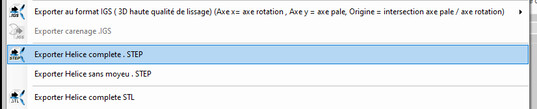
The eleven export entries of the Files menu
2: IGS, and the question of scale
The IGS export gives surfaces of high smoothing quality. Its frame is fixed and worth knowing: X axis = rotation axis, Y axis = blade axis, origin at the intersection of the two.
Two scales are offered. Scale 1 suits most projects; scale 10 exists for small-diameter propellers, whose definition suffers from the rounding of the format: the model comes out ten times larger, and scaling by 0.1 in CAD restores the size.

The two scales of the IGS export
3: STEP, for CAD
Two entries: complete propeller and propeller without hub. The second is used when the hub is a part of your own design — shaft, cone, variable pitch mechanism — and you only want to import the blades.
4: STL, and its five variants
Complete propeller, propeller without hub (for annular ducts), single blade, cyclic part — the repeating angular sector, useful for the calculation as well as for manufacturing — and duct. OBJ is available for the complete propeller and for the duct.
5: GLB, to show without installing anything
The .glb file is binary glTF 2.0: it opens in off-the-shelf 3D viewers and is published directly on a web page. It is the format to send when the recipient has no CAD package — and does not have to install one to turn around your propeller.
6: What the export carries — and what is set elsewhere
An export only translates the geometry of the project. Four points are worth knowing:
- the rounded blade tip and the root fillet are carried by the STL, OBJ, STEP and GLB exports; they are set in the blade dimensions tab — see the dedicated page;
- the hub taper is derived from the rake, the hub staying perpendicular to the generatrix at the blade root, as on a real propeller;
- the exported trailing edge thickness is 0.5 % of the mean chord of the blade — a manufacturing thickness, identical at every radial station. The blend is progressive from 70 % of the chord onwards: the leading edge and the mid-chord, which carry the suction peak, are never touched;
- the direction of rotation of the project is respected: a left-handed propeller exports left-handed — see the conventions.
Going further: the plate blade kit, the generatrix and the surfaces, and the 3D prototype on screen.
 Global site map
 Mecaflux
 Tutorials Mecaflux Pro3D
 Tutorials Heliciel
 Tutorials Heliciel PRO CFD
 Mecaflux Store
 Compare software functions
 Quotes, Orders, Payment Methods
 project technical studies