
Propeller rotational speed: how to define and set it
The rotational speed of a propeller is the number of turns its shaft makes per unit of time, expressed in revolutions per minute (rpm) or in radians per second. Together with the fluid speed, it determines the operating point of the propeller and the relative speeds seen by the blade elements. In Heliciel, we set it with the gauge or by direct entry.
In this page:
- Defining the rotational speed of a propeller
- How to change the rotational speed in Heliciel
- Finding the optimum rotational speed
- A propeller coupled to a motor or generator
1: Defining the rotational speed of a propeller
A speed in rpm converts to angular speed ω (rad/s) by:
ω = 2π × n / 60
where n is the speed in rpm. This angular speed fixes the tangential speed of each blade element: ω × r at radius r. At the blade tip it is ω × R, where R is the propeller radius. This tangential speed combines with the fluid speed to give the apparent speed that the profiles see.
Example: the boat propeller in the screenshot below turns at 50 rpm, that is ω = 2π × 50 / 60 = 5.24 rad/s. With a blade tip radius of about 0.57 m, the blade tip speed is of the order of 3 m/s, or 10.7 km/h: this is the value the gauge displays.
2: How to change the rotational speed in Heliciel
We change the rotational speed of the propeller in two ways: by dragging the needle of the rotational speed gauge, or by typing directly in the 1: Project specifications tab, 1.3: Operating point sub-tab.
The rotational speed gauge shows the speed in revolutions per minute and the blade tip speed. The entry box of the 1.3: Operating point sub-tab lets you enter the propeller rotational speed if it is known. The same sub-tab sets the fluid speed.
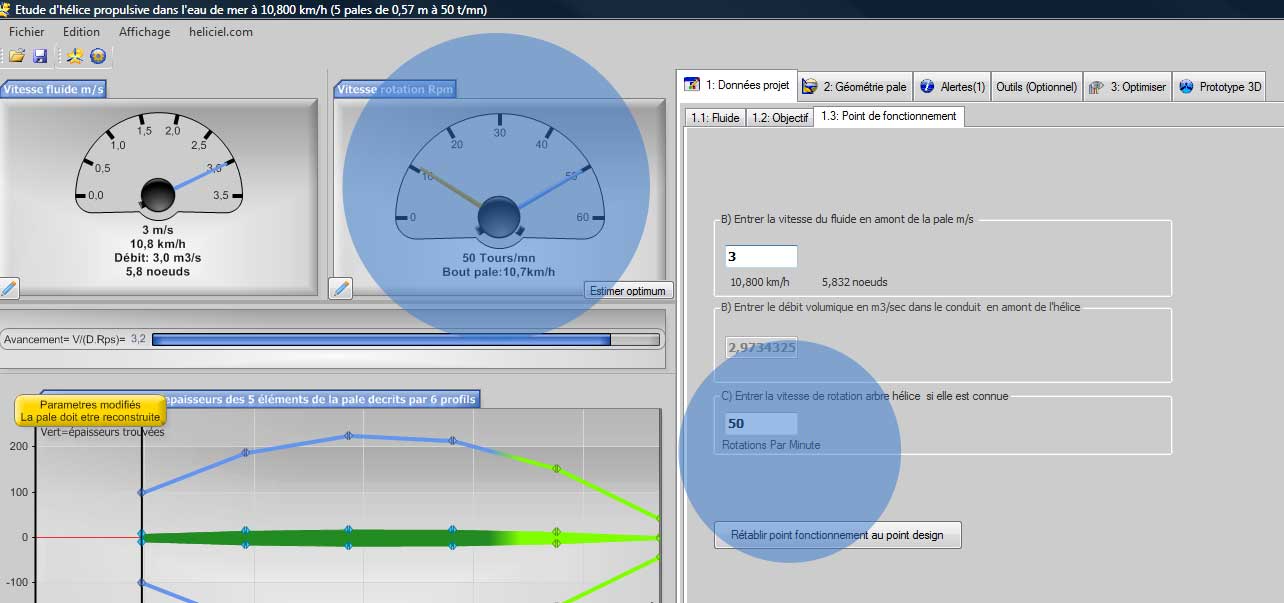
The rotational speed gauge (50 rpm, with the blade tip speed) and the matching entry box, in the operating point sub-tab (screenshot of the French interface).
3: Finding the optimum rotational speed
Heliciel can search for the optimum speed for a given geometry, from the 3: Optimize tab (rotational speed, number of blades, cavitation). For a more complete analysis, we use the multiple analysis, which offers many performance display and test options. With it, it is easy to view a curve of how the propeller's performance evolves with rotational speed.
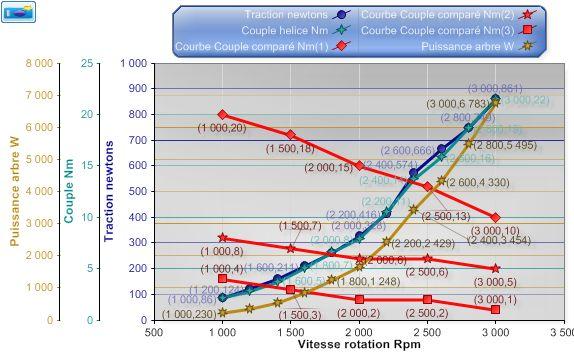
Thrust, propeller torque and shaft power against rotational speed, with compared motor torque curves (French interface).
4: A propeller coupled to a motor or generator
When the propeller is coupled to an electric motor or a generator, its actual rotational speed is the one that balances the driving torque and the resisting torque. To find out how fast the system will turn, we superimpose the propeller torque curve against rotational speed on that of the motor or generator: the multiple analysis does this simply. The balance speed is read at the intersection of the curves.
To go further, we can see how the fluid speed relative to the propeller is set in the same sub-tab, or how the analysis of multiple operating points compares several speeds.
 Global site map
 Mecaflux
 Tutorials Mecaflux Pro3D
 Tutorials Heliciel
 Tutorials Heliciel PRO CFD
 Mecaflux Store
 Compare software functions
 Quotes, Orders, Payment Methods
 project technical studies