
Blade or Wing Profile Angle of Attack: Forcing It in Heliciel
The angle of attack of a blade or wing profile is the angle between its chord and the direction of the fluid; by default, Heliciel applies to each profile the angle that gives the maximum lift-to-drag ratio, whatever the profile selection law. The blade twist is therefore built taking into account the induced velocities and this maximum lift-to-drag angle. Heliciel also lets you force the angle of attack of one element, or of all of them, when the best lift-to-drag ratio is not the goal.
On this page:
- The maximum lift-to-drag angle, the default choice
- Why force the angle of attack of a profile
- How to force the angle of attack in Heliciel
- Do not confuse angle of attack and pitch angle
- Example: a 48° angle of attack on a wind turbine
1: The maximum lift-to-drag angle, the default choice
On a profile, the lift L is the force perpendicular to the movement of the fluid, and the drag D is the force parallel to it, both in newtons. The angle α is the angle of attack. The lift-to-drag ratio is L/D, or Cl/Cd as coefficients: it passes through a maximum at a given angle of attack.
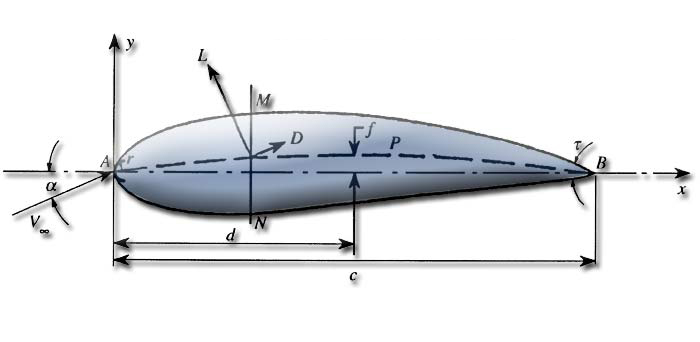
The profile and its forces: lift L is perpendicular to the fluid velocity, drag D is parallel to it, and the angle of attack α is measured between the chord and the fluid.
This maximum lift-to-drag angle guarantees the best thrust-to-torque ratio for a propulsion propeller, and the best capture efficiency for a wind or tidal turbine propeller. Heliciel therefore keeps it for each profile, as long as you ask for nothing else.
2: Why force the angle of attack of a profile
In some cases, you may want to decide the angle of attack of a blade or wing element yourself. Heliciel lets you choose the angle applied to the base profile of each element. The maximum lift-to-drag angle is not always the ideal goal; three situations illustrate this.
- A wind turbine that must start. It is often useful to apply a "maximum lift" angle of attack in the blade root area, for better starting of the machine. These profiles are close to the center of rotation: the loss of lift-to-drag ratio degrades the overall performance of the propeller very little, since its most efficient zone is at 0.7 times the radius.
- A heavily loaded propeller. It must generate a strong thrust within a limited diameter. When the working area is already at its maximum and the rotation speed is set by the motor, you gain thrust by increasing the angle of attack, but efficiency degrades.
- A propeller that cavitates. It may be useful to reduce lift slightly by reducing the angle of attack. Thrust then decreases too.
Heliciel computes the induced velocities and the pitch angle of the blade (or wing) taking into account the performance at the forced angle of attack. You can therefore distort the blade at will and see the effect on performance.
3: How to force the angle of attack in Heliciel
To reach the incidence management, right-click the element in the 3D model, then choose in the context menu Incidence: attack angle (edit/ forcing incidence). Heliciel asks you to rebuild the blade before giving access to forcing: first update the twist at the operating point.
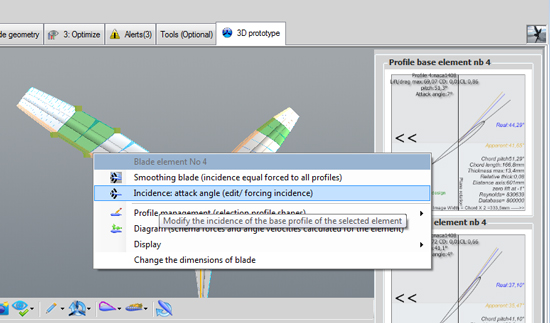
The context menu of a blade element: the "Incidence" entry opens the forcing management.
The Management incidence (attack angles) blade elements window offers a choice of the angle of attack to apply at the base of the selected element. A reminder of the current properties of the base profile is given: Cd, Cl, current 2D lift-to-drag ratio, current angle of attack, maximum lift-to-drag ratio and its angle of attack. You can select another element, or apply the angle of attack to all elements at once. Forcing can also correct blade-shape discontinuities caused by large differences in optimum angle of attack between two profiles.
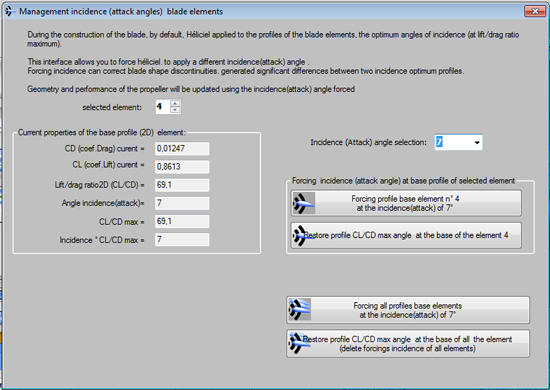
The angle-of-attack management window: on the left the current properties of the base profile of element 3, on the right the choice of angle and the forcing buttons.
Four buttons drive the forcing: force the base profile of the selected element at the chosen angle, restore its maximum lift-to-drag angle, force all base profiles at the chosen angle, or restore the maximum lift-to-drag angle of all profiles, which deletes all forcings. Geometry and performance are updated each time.
4: Do not confuse angle of attack and pitch angle
The angle of attack is the angle between the chord of the profile and the direction of the fluid. The pitch angle is the angle between the chord and the plane of rotation, for a propeller; for a wing, the direction of the fluid is the reference. On a propulsive propeller, the pitch angle equals the fluid angle, corrected for induced velocities, plus the angle of attack; the page on twist and pitch angle of the blade details this link.
Heliciel computes the induced velocities from the performance at the selected angle of attack, then sets the pitch angle of the profile relative to the direction of the fluid corrected for these induced velocities. You impose the angle of attack, and Heliciel deduces the pitch angle. To set the pitch angle of the whole blade directly, the page on pitch angle and blade pitch describes the pitch variator.
5: Example: a 48° angle of attack on a wind turbine
This three-blade turbine has the base profile of its element no. 3, out of 5 elements, forced to an angle of attack of 48 degrees from the direction of the fluid.
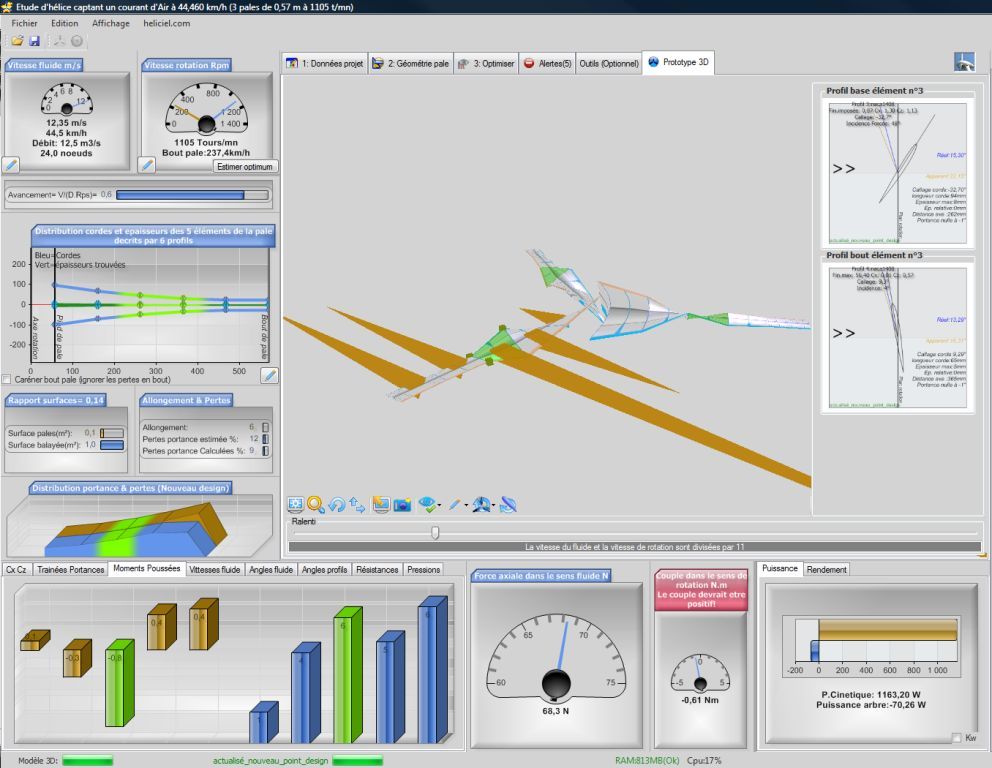
Element 3 is forced to 48°: the right-hand panel confirms it ("Incidence Forcée") and the torque gauge, at the bottom, goes negative.
The rotation moment has reversed and the propeller torque has become negative. If the propeller turned at 1,100 rpm, as in this test, it would suffer a braking torque of 0.6 N·m in this configuration. This case is very unlikely, but it shows the effect of forcing the angle of attack on performance, and its possible use to simulate braking devices.
To go further, we can look at how forcing combines with the induced velocity in the twist calculation, or how the position of the generatrix changes the behavior of the blade on the page about the blade generatrix and pitching moment.
 Global site map
 Mecaflux
 Tutorials Mecaflux Pro3D
 Tutorials Heliciel
 Tutorials Heliciel PRO CFD
 Mecaflux Store
 Compare software functions
 Quotes, Orders, Payment Methods
 project technical studies