
Boat Propeller 5/5: Analyzing Performance with the Multiple Analysis
Part 1 · Part 2 · Part 3 · Part 4 · Part 5
To analyze the performance of a boat propeller, the multiple analysis of Heliciel calculates in one run the thrust, the shaft power and the efficiency over a whole range of rotational speeds. In this last part, we use it to meet the design brief again with the optimum profile of part 4, instead of groping speed by speed.
On this page:
- The optimum profile no longer matches the design brief
- Setting up the multiple analysis of the propeller
- Reading the curves: thrust, shaft power and efficiency
1: The optimum profile no longer matches the design brief
In the previous part, we saw how to choose and apply a profile to a propeller. We now see how to analyze quickly the overall performance of our boat propeller.
The optimum naca64a410 profile is applied, but the performance of this profile at 460 revolutions per minute no longer matches our design brief:
- cruising speed: 3 knots;
- thrust required: 105 newtons;
- power available at the propeller shaft: 192 watts.
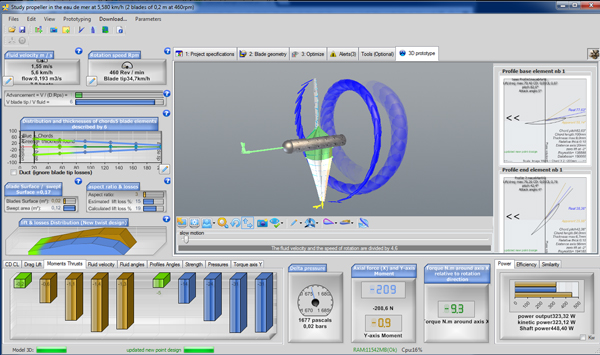
The propeller rebuilt with the naca64a410 at 460 rpm, which gives too much thrust and demands too much power.
We could test rotational speeds to adjust the power, as in part 3. We prefer a more powerful tool, the multiple analysis, which shows how the performance of the propeller changes along a curve of rotational speeds.
2: Setting up the multiple analysis of operating points
To display the multiple analysis interface, we click Multi Analysis in the Heliciel toolbar, or the Multi Analysis button of the 3: Optimize tab.
The "Multi Analysis" button of the Heliciel toolbar (tooltip visible).
We set the varying parameter to Rotation speed Rpm, and the operating range from 100 to 300 rpm with 11 points, a step of 20 rpm. The method of calculation of the operating points must be Refreshing twist, so that the software rebuilds the optimum twist at each point of the curve.
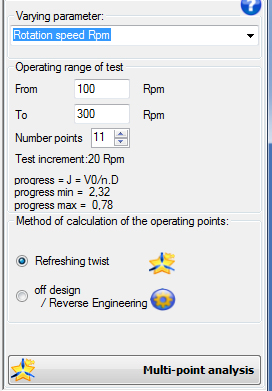
The multiple analysis settings: from 100 to 300 rpm, 11 points (increment 20 rpm), "Refreshing twist" mode. Heliciel shows the advance ratio J, from 2.32 to 0.78.
3: Reading the thrust, shaft power and efficiency curves
We select the Compare tab, we tick the thrust, shaft power and propulsive efficiency curves, then we run the analysis.
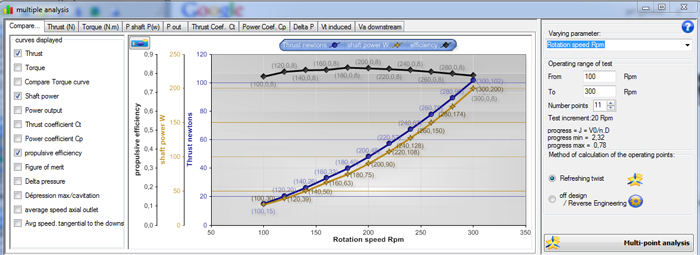
The three curves compared from 100 to 300 rpm: propulsive efficiency (black curve, around 0.8), shaft power in watts (200 W at 300 rpm) and thrust in newtons (102 N at 300 rpm).
The curves show three results:
- the propulsive efficiency stays close to 0.8 over the whole range and peaks broadly between 160 and 200 revolutions per minute;
- the thrust reaches about 102 newtons at 300 revolutions per minute: the 105 N of the design brief therefore calls for a slightly higher speed;
- at 300 revolutions per minute, the shaft power is 200 W, for an efficiency of 0.8.
The 200 W slightly exceed the 192 W of our design brief: this is a compromise to settle, either by accepting the small gap or by lowering the target thrust. With this profile, we get about the thrust we want around 300 rpm, whereas 460 rpm was needed with the naca1408 of part 3.
With this tutorial, we have gone over the means and tools that Heliciel offers to build a propeller from a design brief. You are now ready to create your own made-to-measure propeller for all your projects.
To go further, we can review the principles of the boat propeller, or follow the tutorial on optimizing an aircraft propeller, which explores other levers (number of blades, chords).
 Global site map
 Mecaflux
 Tutorials Mecaflux Pro3D
 Tutorials Heliciel
 Tutorials Heliciel PRO CFD
 Mecaflux Store
 Compare software functions
 Quotes, Orders, Payment Methods
 project technical studies