
Blade Profile Pitch Angle and Propeller Blade Pitch: Three Ways to Set It in Heliciel
The profile pitch angle follows from the pitch retained. Pitch in millimetres and pitch ratio P/D of a B-series propeller: prop pitch calculator
By default, Heliciel computes the pitch angle of the blade profiles, but you can also set it by hand, element by element, or vary the pitch angle of the whole blade in one move to simulate a variable-pitch propeller. The pitch angle is the angle between the chord of a profile and the plane of rotation; it sets the geometric pitch of the profile, which the page on propeller pitch details. Here we look at three ways of controlling the pitch angle of the blade, and what each one changes in the twist.
On this page:
- Automatic optimum pitch angle, the default setting
- Manual forcing of the angle of attack, to control the twist
- Varying the overall pitch angle of the blade, to simulate variable pitch
1: Automatic optimum pitch angle, the default setting
This is Heliciel's default option. When you click Rebuild  after changing the operating point or the geometry, Heliciel sets the pitch angle of the blade profiles to the angle of attack that gives the best lift-to-drag ratio. Induced velocities are taken into account in determining this pitch angle. This method delivers the optimum theoretical efficiency for the geometry and operating point you set.
The pitch angle of the profiles thus follows from the pitch chosen. To compute the pitch in millimeters and the P/D pitch ratio of a B-series propeller, a calculator is available: propeller pitch calculator.
The two other methods serve to control the propeller's performance strategy: the second changes the blade twist, the third leaves it untouched.
2: Manual forcing of the angle of attack, to control the twist
You can fully control the pitch angle of your blade's profiles by forcing their angle of attack. The blade twist is then controlled by hand. You must distinguish pitch angle from angle of attack. If you force the angle of attack to 20°, for example, you tell Heliciel that the pitch angle (the angle between the plane of rotation and the profile chord) will be the one that generates induced velocities leading to an angle of attack of 20°. That angle of attack is measured between the profile chord and the real direction of the fluid, computed by adding up the apparent and induced velocities. The 20° figure is only an example.
In the 3D model, select a blade element, then open the context menu by right-clicking the element whose angle of attack, and therefore pitch angle, you want to change.
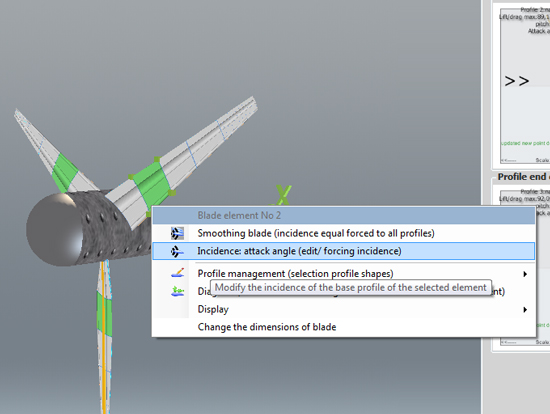
The context menu of a blade element: "Incidence: attack angle (edit/ forcing incidence)" opens the control window.
Choose Incidence: attack angle (edit/ forcing incidence) to open the window for manual control of the profiles' angle of attack.
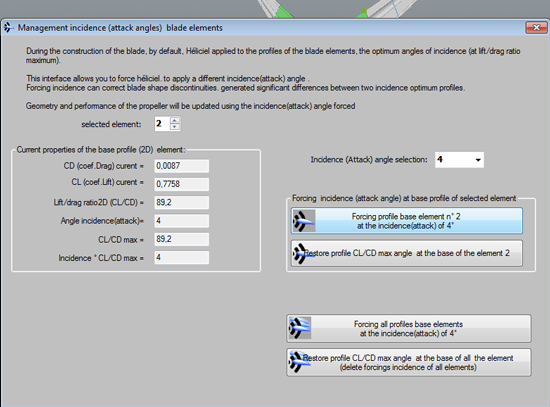
The angle-of-attack management window: selected element, base profile properties, angle to apply.
Heliciel has a profile database that contains profile performance over 360°. Angles beyond stall are extrapolated following flat-plate performance theories. You can therefore choose the angle of attack at the base of the selected element, then rebuild the propeller and the performance calculation with this forced angle of attack included.
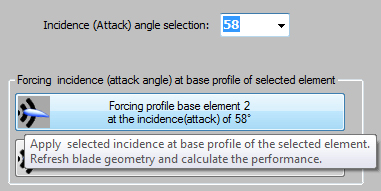
The base profile of element 3 forced to 58°.
In this example, a wind turbine has the base profile of its third element forced to a 58° angle of attack. The result does not give good efficiency: it rather destroys the propeller's performance. The torque even becomes negative, which means the wind turbine is under braking torque.
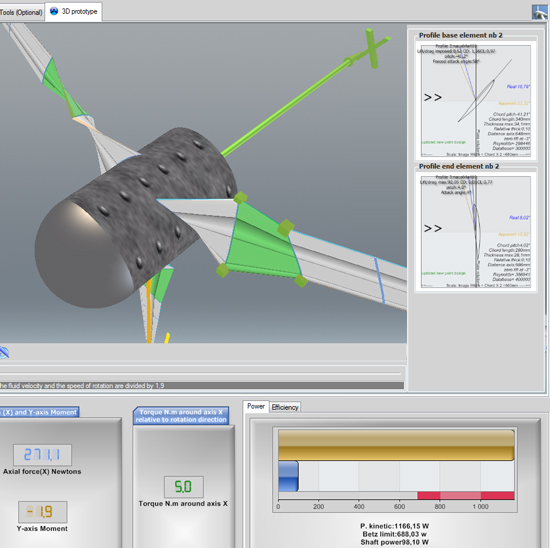
After forcing to 58°, the displayed rotation torque is negative (about −1.7 N·m) and so is the shaft power.
3: Varying the overall pitch angle of the blade, to simulate variable pitch
The blade can turn on its axis through an angle you choose. This does not change the blade twist, since every profile has its pitch angle changed by the same value. You thus simulate a pitch-variation system, and compute the performance of a variable-pitch propeller at different angles. Heliciel calls this tool the pitch variator: in the 3D model toolbar, it is the last button on the right.
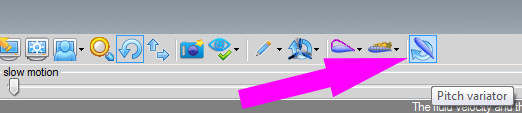
The Pitch variator button, at the right end of the 3D model toolbar.
Choose the angle with the slider, then launch the performance calculation. The blade geometry and its twist stay identical, because the whole blade turns on its axis. This tool is ideal for simulating propellers with a pitch-variation system.
While the Pitch variator is open, the project parameters are locked (tabs and functions disabled): close the variator with Close variator to reach them again. If you changed the blade geometry, rebuild it before opening the variator. The Restore button brings the pitch angle and the performance back to the design point, and the variator is not compatible with reverse-engineering mode.
In the example below, the pitch variation put our wind turbine under braking torque. The rotation speed cannot be maintained, because the torque is negative: we have gone from capture-propeller mode to propulsion-propeller mode. For that, the generator would have to be turned into a motor.
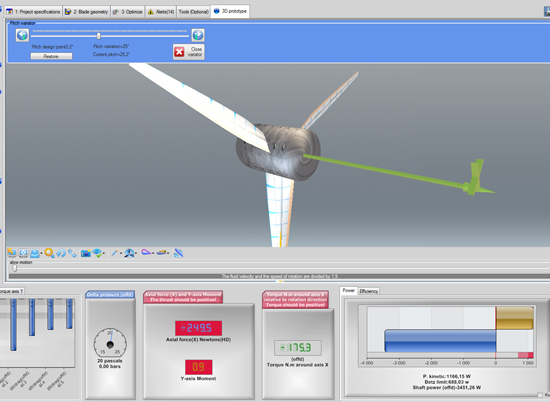
The pitch variator open at the top of the 3D model: at this angle, the axial force and the torque show in red, negative, and the propeller goes into propulsion mode.
To go further, we can look at why the blade is twisted on the page about blade twist and pitch angle, how geometric pitch differs from effective pitch with propeller pitch, or how a propeller whose pitch is adjustable is built on the variable-pitch propeller principle.
 Global site map
 Mecaflux
 Tutorials Mecaflux Pro3D
 Tutorials Heliciel
 Tutorials Heliciel PRO CFD
 Mecaflux Store
 Compare software functions
 Quotes, Orders, Payment Methods
 project technical studies