
Draw, trace, generate a NACA, handle a folded sheet, build a family, repair a polar: the complete aerofoil workshop.
Draw, correct and edit an aerofoil
In any serious project a moment comes when no catalogue section will do: you have a section measured off an existing part, a folded sheet, a series 6 aerofoil imposed by a cavitation constraint, or a thickness that has to evolve from root to tip. Heliciel lets you build them.
- Tutorial outline:
- Drawing an aerofoil
- Tracing an existing shape
- The NACA editors
- Thick trailing edges
- Thin sections and sheet metal
- Building a family of aerofoils
- Repairing a polar
1: Drawing an aerofoil
The drawing window gives you control over the points of the section, with leading edge and trailing edge zooms — the two zones where an irregularity of a tenth of a millimetre ruins a boundary layer calculation — and a set of correction tools.
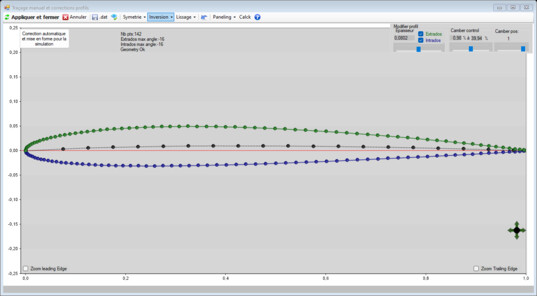
The drawing window
2: Tracing an existing shape
Overlay mode displays an image in transparency under the section: a photograph of a section, a scanned drawing, a template survey. You follow the contour point by point. It is the simplest way to bring an existing blade into Heliciel, before computing its performance by reverse engineering.
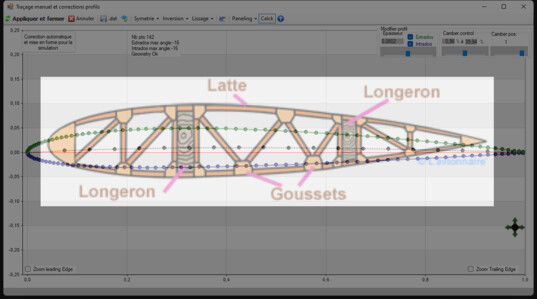
Overlay mode
3: The NACA editors
The NACA 4-digit editor generates the classical sections, with a denser set of points at the leading edge. The NACA series 6 editor, laminar, was added for projects sensitive to cavitation: its flatter pressure distribution delays the suction peak that triggers cavitation.
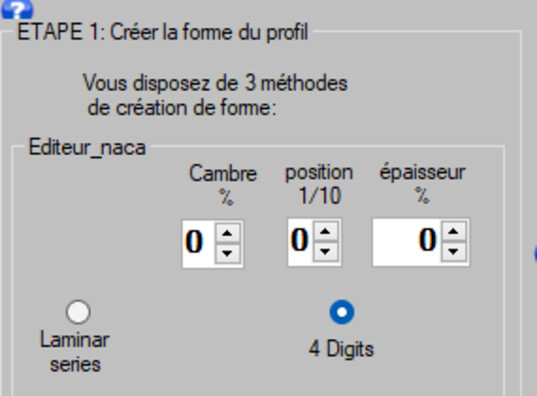
The NACA 4-digit editor
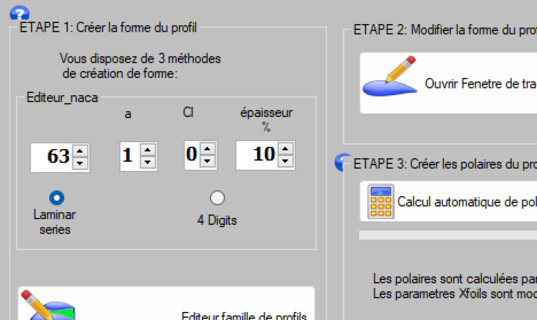
The NACA series 6 editor
4: Thick trailing edges
A thick trailing edge is not a defect: on a very thick section, the Xfoil manual itself states
that convergence is better with a thick trailing edge than with a sharp one. When a .dat file is
imported, automatic trailing edge correction is no longer applied: the section enters exactly as it was
measured.
5: Thin sections and sheet metal
Sheet metal blades and very thin sections do not converge under a code designed for thick aerofoils: that is the limit to be aware of when describing a folded sheet fan blade or the vane of a small turbine.
6: Building a family of aerofoils
The aerofoil family editor builds a progressive transformation from one section to another. That is exactly what a real blade needs: a thick, robust section at the root, a thin, efficient section at the tip, and a continuous evolution between the two — instead of an abrupt jump from one catalogue section to the next.
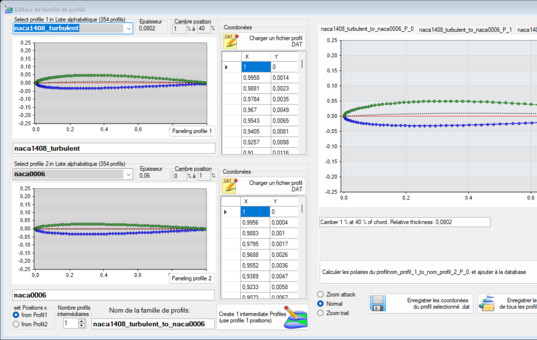
A family: from the root section to the tip section
7: Repairing a polar
A computed polar may contain an obviously wrong point — an unconverged stall, an isolated jump. The polar modification tools let you:
- modify, edit, correct the selected polar;
- enter a polar by hand: this is the way in for wind tunnel or towing tank measurements, when you have something better than a calculation;
- extend the polar with Xfoil by ±1°, down to negative Cl or to decreasing Cl;
- mirror the polars of symmetrical sections, and complete over 360° — useful for machines working outside their nominal range.
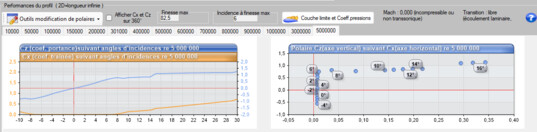
Correcting an outlying point
A polar modified by hand must be recorded in the study file: it is an input of the calculation, just like the fluid or the rotation speed.
 Global site map
 Mecaflux
 Tutorials Mecaflux Pro3D
 Tutorials Heliciel
 Tutorials Heliciel PRO CFD
 Mecaflux Store
 Compare software functions
 Quotes, Orders, Payment Methods
 project technical studies