
Rotation speed, blade count, radius, chords: these settings hold together. The genetic search explores them as a whole, towards the target you set.
The genetic analysis: optimising several settings at once
The settings of a propeller are not independent: raising the blade count changes the optimal rotation speed, which changes the useful chord, which changes the radius worth choosing. Optimising them one after another gives a consistent result, but not an optimal one. The genetic search explores them together.
1: The limit of the manual method
The classical method remains the right schooling: it shows why an optimum exists. But it explores one axis at a time. The genetic search explores a population of solutions, crosses the best ones and starts again: it finds compromises that a succession of sweeps never meets.
2: The genes, and their bounds
The Genes group lists what the search is allowed to change:
- Rpm: the rotation speed;
- Blades number;
- Blade tip radius mm;
- Chord distribution, described by its polynomials.
Each gene has its search Range. Those bounds are not a formality: they are where you write down your real constraints — the speed the motor can hold, the radius the clearance allows, the blade count the workshop accepts. A search without serious bounds produces a propeller that is optimal and unbuildable.
The button, in the “3: Optimize” tab
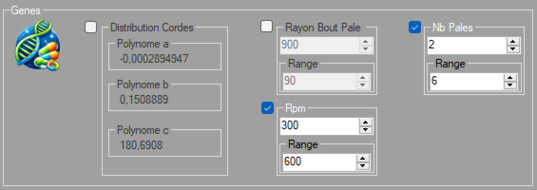
The genes and their ranges
3: The target
The Target (Fitness) group offers two objectives: Max thrust, in newtons, or Max efficiency. The choice is not innocent: maximising thrust gives a propeller that pulls hard in the conditions aimed at; maximising efficiency gives a thrifty propeller, often less loaded. A tugboat propeller and a sailing-yacht propeller are not searched for with the same target.

Thrust or efficiency
4: Launch, follow, stop
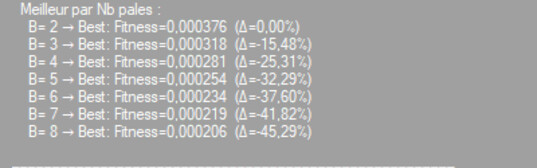
The search displays its progress: at each generation, the best solution found. When the curve flattens, there is nothing more to wait for: Stop search. The results log keeps the characteristics of the best individual.
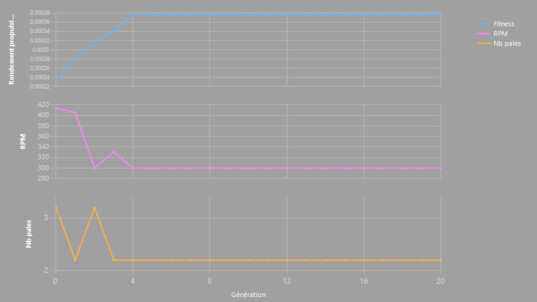
Convergence, generation after generation
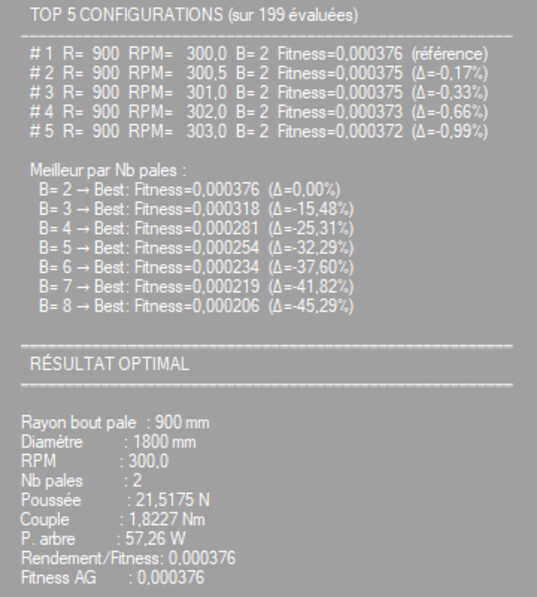
The results log
5: Apply — then check
Apply the solution you keep, rebuild the prototype, and compare with the starting point. Then check: design alerts, blade strength, cavitation for a marine propeller. An optimisation is not a validation.
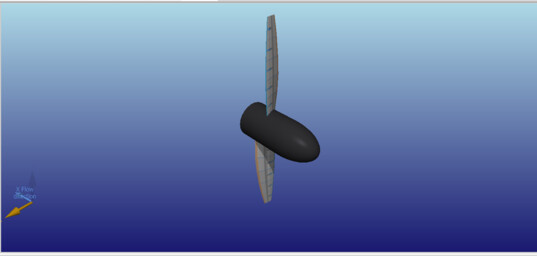
The geometry kept
Before / after
 Global site map
 Mecaflux
 Tutorials Mecaflux Pro3D
 Tutorials Heliciel
 Tutorials Heliciel PRO CFD
 Mecaflux Store
 Compare software functions
 Quotes, Orders, Payment Methods
 project technical studies