
Wind turbine propeller modeling in heliciel
Wind turbine blade plan: an example with Heliciel
The blade plan of a wind turbine boils down to a series of airfoil profiles, each placed at a precise distance from the axis and tilted by a given pitch angle relative to the plane of rotation. Heliciel calculates these profiles, their chord and their twist, then supplies them as a 3D file for CAD (computer-aided design) or as a paper plan to build the blade.
A wind turbine includes transmission, braking and energy conversion parts, which the rotor merely drives. Heliciel concentrates on the propeller part. The turbine plan is therefore covered here only at the level of the plan of the wind turbine blades. The whole approach is in the article on how to build a wind turbine.
In this page:
- Wind turbine blade plan: IGS format and paper plans
- The plan of a blade profile: position, pitch angle and chord
- The blade plan: a sum of profiles
- From plan to manufacture
1: Wind turbine blade plan: IGS format and paper plans
Today, the plans that define the geometry of a blade are digital files that can be exchanged between CAD programs. Heliciel exports its blade plans in IGS format, which most CAD programs read. To learn more about the 3D plans it produces, see Heliciel 3D propellers and wings.
We may also need a paper plan, without going through CAD. Heliciel provides this type of plan too, as we see below.
2: The plan of a blade profile: position, pitch angle and chord
The plan of a blade section is an airfoil profile. It fully defines the blade twist, since each profile carries its own pitch angle. Here is an example of a wind turbine blade profile plan, as displayed by the profile image editor of Heliciel.
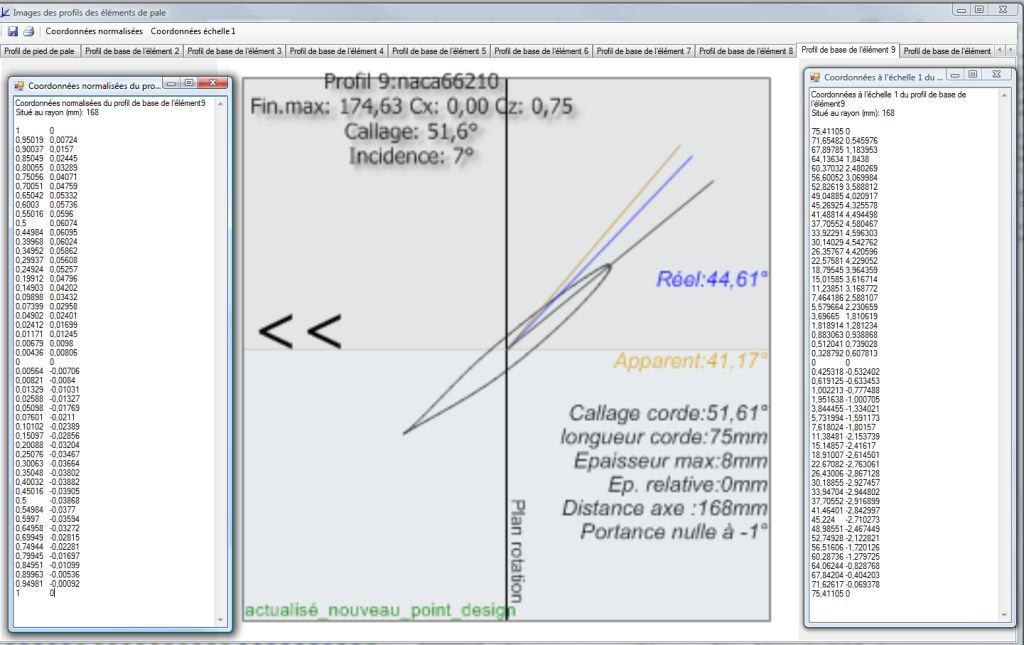
In the profile image editor, one tab per blade element. This one shows a NACA 66210 profile located 168 mm from the axis, with its pitch angle of 51.6°, its 75 mm chord, its maximum thickness of 8 mm and its coordinates, normalized and then scaled to the blade.
On this screen we read the chord pitch angle (51.6°) and the angle of attack of the profile (7°), two angles not to be confused: the pitch angle is the tilt of the chord relative to the plane of rotation, while the angle of attack is the difference between that chord and the real direction of the flow (44.6° here).
3: The blade plan: a sum of profiles
The drawing of the blade is a sum of profile drawings, which fully define the blade. Here is an example of a wind turbine blade plan made of profile plans.
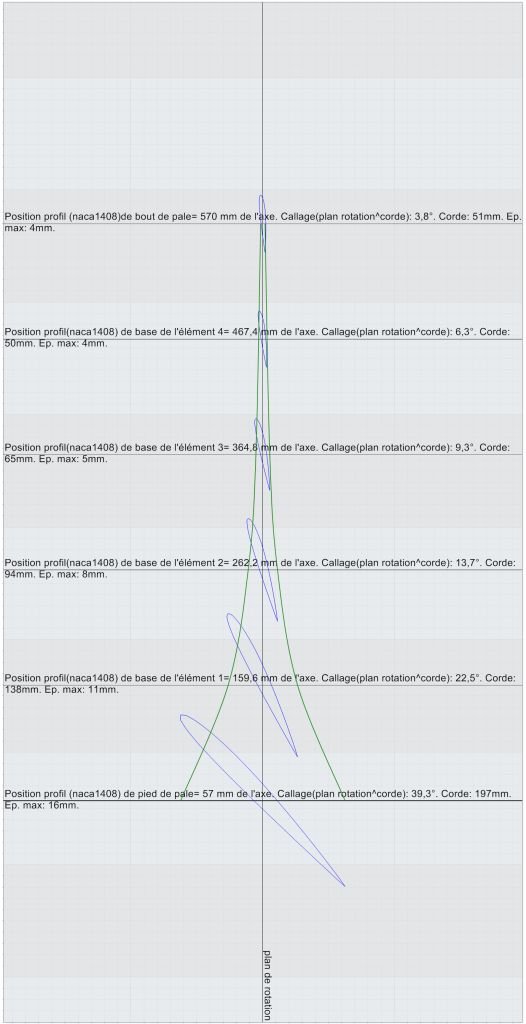
Wind turbine blade plan: the profiles, from the root (bottom) to the tip (top), straighten up and shrink. Each line gives the position of the profile on the axis, its pitch angle relative to the plane of rotation, its chord and its maximum thickness.
The Heliciel software therefore supplies the plan of the wind turbine blades as profiles that state their position on the axis and their pitch angle relative to the plane of rotation. These are the values we read on this plan, for NACA 1408 profiles:
| Profile | Position on axis (mm) | Pitch angle (°) | Chord (mm) | Max. thickness (mm) |
|---|---|---|---|---|
| Blade root | 57 | 39.3 | 197 | 16 |
| Element 1 | 159.6 | 22.5 | 138 | 11 |
| Element 2 | 262.2 | 13.7 | 94 | 8 |
| Element 3 | 364.8 | 9.3 | 65 | 5 |
| Element 4 | 467.4 | 6.3 | 50 | 4 |
| Blade tip | 570 | 3.8 | 51 | 4 |
These values illustrate the twist: the pitch angle goes from 39.3° at the root to 3.8° at the tip, and the chord shrinks from 197 mm to about 50 mm.
4: From plan to manufacture
Building a wind turbine becomes simple once the blade plan is supplied. To edit the blade plans, the procedure is detailed on the page about editing a wind turbine plan.
Heliciel exports its blade plans in IGS format and also supplies paper plans of profiles, with their position on the axis and their pitch angle. The procedure is described on the page about wind turbine plan and propeller drawing.
To go further, we can see how blade twist and pitch angle are calculated, which materials and structure give the blade its mechanical strength, or how to choose a wind turbine generator.
 Global site map
 Mecaflux
 Tutorials Mecaflux Pro3D
 Tutorials Heliciel
 Tutorials Heliciel PRO CFD
 Mecaflux Store
 Compare software functions
 Quotes, Orders, Payment Methods
 project technical studies