
Blade thickness distribution for a propeller or wing: constant profile or imposed thickness
The distribution of blade thicknesses for a propulsion propeller, wind turbine, turbine or tidal turbine is defined in two ways in Heliciel: the thickness is imposed by a constant profile, or you set it by hand with the thickness distribution sliders. The first suits beginners; the second, for advanced users, lets Heliciel search its database for the profiles that come closest to the requested thickness.
In this page:
- Why the blade thickness matters
- Thickness imposed by the constant profile
- Thickness set manually with the sliders
1: Why the blade thickness matters
The thickness of the blade or wing plays an important role in the lift-to-drag ratio of the profile, that is the ratio of lift (CL) to drag (CD). The performance of the propeller or wing is directly tied to the lift-to-drag ratio of its profiles, and thick profiles produce more drag than thin profiles. We therefore look for the thinnest profiles possible to increase performance.
But be careful: the distribution of thicknesses along the blade or wing is also a decisive factor in its strength. A thin profile bends and breaks more easily than a thick one. The choice of profiles is therefore a compromise subject to criteria, which we set out on the page on blade and wing profiles, and which the blade strength test checks.
2: Thickness imposed by the constant profile
This definition is recommended for beginners. If the constant profile law is chosen, the thickness of the blade is determined by the chord distribution and by the relative thickness of the profile, since the shape is constant.
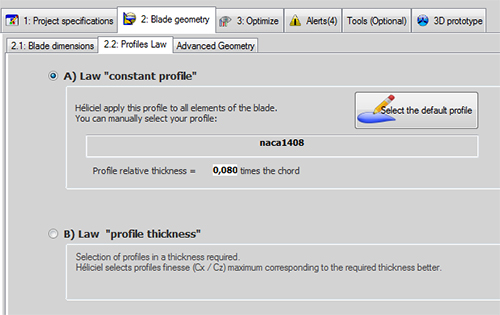
The constant profile law with the naca1408 profile, of relative thickness 0.080 times the chord.
The relative thickness of the profile is the ratio profile thickness / profile chord. When the chord grows, the thickness therefore grows proportionally. For a chord of 100 mm and a relative thickness of 0.08, for example, the thickness is 8 mm; for a chord of 50 mm, it is 4 mm. Adjusting the thickness with a slider is therefore disabled when the profile law is constant.
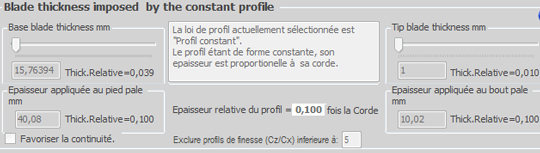
With the constant profile law, the thickness sliders are locked: the applied thickness follows the chord (relative thickness 0.100 in this capture).
3: Thickness set manually with the sliders
This definition is for advanced users. If the profile-thickness law is chosen, the thickness distribution sliders are enabled. You can then impose a thickness independently of the chord: the thickness requested at the blade base, the thickness requested at the blade tip, and between the two the shape of the distribution, which is elliptical, with the intermediate thicknesses slider.
This thickness is imposed when the profiles are chosen. Heliciel searches its database for the profiles that come closest to the chord and the thickness you impose. The profile that exactly meets these conditions may not exist in the database: a difference between the imposed thickness and the applied thickness may therefore appear.

On the left, the blade diagram; on the right, the requested thicknesses (yellow boxes) and applied thicknesses (green boxes).
The blade diagram shows:
- in yellow (orange): the thickness requested with the sliders;
- in green: the thicknesses found in the database.
In the capture, for example, the thickness requested at the blade base is 382 mm and the one applied 47.44 mm; at the blade tip, 6.56 mm requested and 17.22 mm applied. The difference shows that the profile database does not contain a profile that combines the chord and the thickness requested: we then have to revise the request, or change the database (see modifying the profile database).
Two settings help keep a consistent blade. The Favoriser la continuité (favour continuity) box applies the thickness only if it does not cause too large a gap between two consecutive profiles. The Exclure profils de finesse (Cz/Cx) inférieure à field (exclude profiles with a lift-to-drag ratio below) removes from the search the profiles whose lift-to-drag ratio is below the value entered, which imposes a minimum quality on the automatic choice of profiles.
To go further, we can compare the two laws in the page on profile selection methods and laws, and rebuild the blade with the Rebuild propeller function  to apply the chosen thickness.
 Global site map
 Mecaflux
 Tutorials Mecaflux Pro3D
 Tutorials Heliciel
 Tutorials Heliciel PRO CFD
 Mecaflux Store
 Compare software functions
 Quotes, Orders, Payment Methods
 project technical studies