
Propeller and wing types in Heliciel: choosing the goal of the study
Heliciel models four types of propellers and wings, each with its own goal: propulsion propellers, propellers that build pressure for a given flow (ventilation, axial pumps), energy-harvesting propellers (wind turbines, tidal turbines) and wings and foils. The type of study fixes the question the calculation answers, so we make this choice first, before entering the geometry.
In this page:
- The four types of study and their goal
- How to choose the type of study
- Choosing the type of study in Heliciel
1: The four types of study and their goal
Four types of study and goal can be carried out with Heliciel:
- Propulsion propellers: boat propellers, aircraft propellers and helicopter rotors, drone propellers. The goal is thrust; the question is the shaft power to supply.
- Propellers that build pressure for a given flow: ventilation propellers, axial pump propellers and jet ski turbines. The goal is the pressure rise for a given flow rate.
- Energy-harvesting propellers: wind motors and wind turbines, tidal turbines and axial Kaplan turbines. The goal is the power recovered on the shaft.
- Wings and foils: wings, fins, foils, hydrofoils, sails, centreboards, rudders, airships and hulls. The goal is lift.
In every case Heliciel applies the same method, BEM (Blade Element Momentum theory), which cuts the blade or wing into elements and calculates the forces on each. Only the goal we set changes, and so does the way we read the calculation results.
2: How to choose the type of study
Let us ask the question the other way round: what must our blade do? If it must push a boat, an aircraft or a drone, we choose a propulsion propeller. If it must move a fluid through a duct and raise its pressure, we choose a pressure-for-flow propeller. If it must take energy from the wind or from a current, we choose an energy-harvesting propeller. If it does not rotate and carries a vehicle or steadies a movement, we choose a wing or a foil.
This choice also determines the fluid speed that we impose on the calculation: the vehicle speed for a propulsion propeller or a wing, the duct flow rate for a fan, the mean wind speed for a wind turbine, the current speed for a tidal turbine. This speed and the rotational speed then form the operating point of the propeller.
The fluid is part of the question too: the same propulsion propeller can be calculated in air or in water, as the list of starting models offered by Heliciel shows.
3: Choosing the type of study in Heliciel
The basic models are projects prepared with the basic calculator settings. They correspond to eight basic types of project:
- propulsion propeller in air (thrust generation);
- ventilation propeller, ducted (pressure generation);
- air-harvesting propeller (torque generation), wind turbine or wind motor;
- water-harvesting propeller (torque generation), propeller turbine or tidal turbine;
- propulsion propeller in water (thrust generation);
- axial pump propeller, ducted (pressure generation);
- hydrofoil;
- wing.
The File menu, New project (from a model) entry, offers these eight starting models. The project goal is then set in the project specifications tab (1: Project specifications).
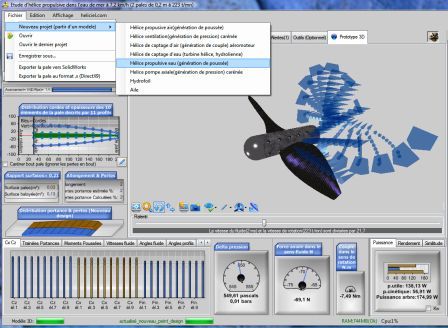
The File menu open on New project (from a model): the list on the right gives the eight starting models (screenshot of the French interface).
To go further, we can see how to read the propeller and wing calculation results, or how the operating point is set once the type of study is chosen.
 Global site map
 Mecaflux
 Tutorials Mecaflux Pro3D
 Tutorials Heliciel
 Tutorials Heliciel PRO CFD
 Mecaflux Store
 Compare software functions
 Quotes, Orders, Payment Methods
 project technical studies