
Tutorial: design and build wind turbine blades with Heliciel
Building a wind turbine propeller with Heliciel means chaining five decisions: the fluid, the reference wind speed, the diameter, the rotation speed and the airfoil. In the example of this tutorial (a site at 500 m altitude, a 5.5 m/s wind, a rotor 4 m in diameter), we end up with a three-blade wind turbine rotor that delivers about 690 W at the shaft, very close to the Betz limit. Each step below gives the values to enter and what you should see on the screen.
We saw the basic parameters in how to build a wind turbine propeller and in wind turbine power and wind speed. Here we move on to practice, with Heliciel. Author: JF Iglesias (Heliciel developer).
In this tutorial:
- Select the fluid: air density versus altitude
- Set the reference wind speed
- Calculate wind turbine power from its diameter
- Find the optimum rotation speed of the propeller
- Specific speed: slow or fast turbine, how to choose
- Choose an optimum blade airfoil
To start, we open a "wind turbine" model in Heliciel. We first build a simple fixed-pitch propeller, designed for one optimum wind speed.
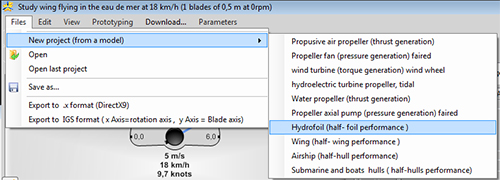
File > New project (from a model): the "wind turbine (torque generation) wind wheel" model is the one we need.
1: Select the fluid: air density versus altitude
The power of the wind is proportional to the density of the air, and the density drops with altitude. Heliciel calculates it from the temperature and the altitude you give it.
In the Project specifications tab, click "Modify the ambient fluid" to open the fluid editor. Select Air at 20 °C, then "Use this fluid". Heliciel asks whether you want to use the atmospheric pressure calculated from the altitude: click "Yes".
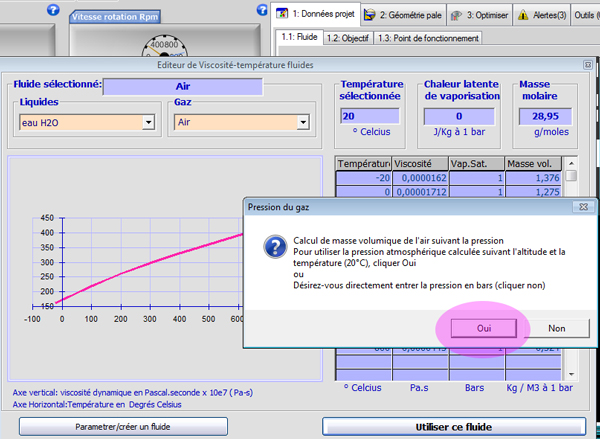
The fluid editor, with air at 20 °C. The "Pression du gaz" window offers to calculate the pressure from the altitude (the "Oui" button, French interface).
Imagine that the altitude of our site is 500 m. Enter 500 (meters) in the atmospheric pressure window.
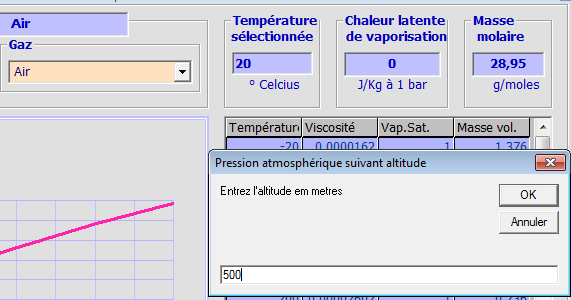
Entering the altitude of the site: 500 meters.
Heliciel updates the air density: 1.143 kg/m³.
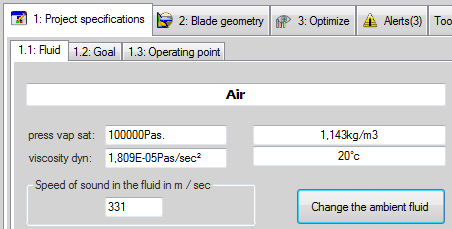
The Fluid tab shows the density retained (1.143 kg/m³), the dynamic viscosity and the speed of sound (331 m/s).
2: Set the reference wind speed
To choose the wind speed of our site, we use the Heliciel wind map, available in the Goal tab of the software. Here we use the map of the USA.
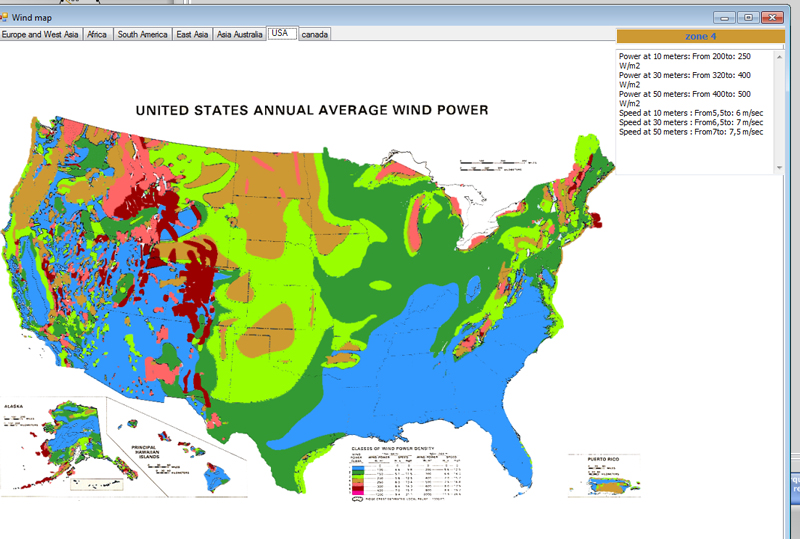
The wind map opens from the Goal tab. Zone 4 is selected, and its data appear at the top right of the map.
Click on the map at the position of your site (here, zone 4): the power and wind data update at the top of the map.
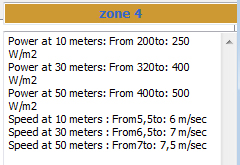
Zone 4: at 10 m height, 200 to 250 W/m² and 5.5 to 6 m/s; at 50 m, 400 to 500 W/m² and 7 to 7.5 m/s.
We saw in wind turbine power and wind speed that height and terrain correct the wind speed. In this simple tutorial we take the speeds of the map, and we retain the speed at 10 m: 5.5 m/s. You impose this value; Heliciel will use it as the inlet speed of the calculation.
- Reference speed selected: 5.5 m/s.
- Instantaneous wind power per m²: P/S = ½ × ρ × V³ = 0.5 × 1.143 × 5.5³ ≈ 95 W/m².
- This instantaneous power differs from the average power given on the map, which averages all the wind speeds met during the year (see wind speed of a site and its power).
3: Calculate wind turbine power from its diameter
The rotor diameter sets the power of the wind turbine. With the wind speed and the density, we have the wind power per m². We still have to subtract what physics and mechanics take from us:
- Betz showed that we recover at best 16/27 of the instantaneous energy of the wind, that is 59.3%. We round it to 60%: 95 × 0.6 = 57 W/m².
- The efficiencies of the various parts of the system (transmission, generator) leave only 80% of that power: 57 × 0.8 = 45.6 W/m².
- The power of our wind turbine is therefore π × radius² × 45.6. With this formula, we establish the power for each rotor diameter:
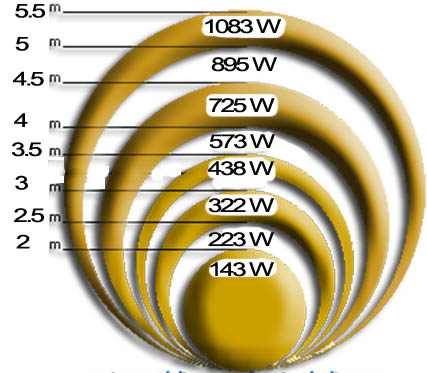
Wind turbine power versus rotor diameter: from 143 W (2 m) to 1,083 W (5.5 m), for the 5.5 m/s wind retained.
We decide that our blades will be 2 m long (diameter: 4 m). The swept area is therefore 3.14 × 2² = 12.56 m², and the estimated power 12.56 × 45.6 = 572.7 W.
We could now choose the rotation speed of the propeller from the speed of a generator that produces about this power at the shaft. But nothing would tell us that the propeller turns at its optimum speed for the chosen wind, and its efficiency would probably be poor. So Heliciel will look for the optimum rotation speed for us.
4: Find the optimum rotation speed of the propeller
4a: Search for the optimum speed
In the Project specifications tab, under operating point, enter the fluid velocity: 5.5 m/s. Also enter a rotation speed taken at random: 1,000 rpm. This choice is deliberately bad: Heliciel will tell us so.
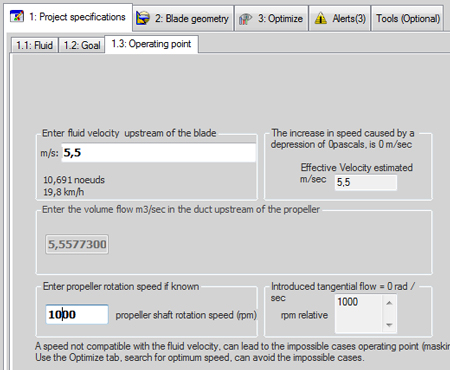
Tab 1.3 Operating point: fluid velocity 5.5 m/s (19.8 km/h) and rotation speed 1,000 rpm.
In the 2: Blade geometry tab, under "Blade dimensions", enter the radius at the blade tip (2,000 mm) and a radius at the blade root set with the cursor to 10% of the radius, for example.
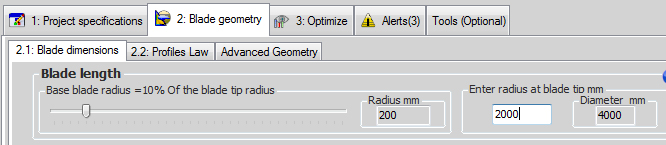
Tab 2.1 Blade dimensions: tip radius 2,000 mm (diameter 4,000 mm), blade root at 10%, that is 200 mm.
Enter a chord of 200 mm at the blade root and a chord of 50 mm at the blade tip. Do not forget to click "linearize" to update the distribution of the chords along the blade.

The chords at the root and at the tip of the blade; the "linearize" button spreads the intermediate chords between the two.
In tab 2.2 Profiles Law, make sure that your profile law is set to "constant profile". If the profile is not the NACA 1408, click "Select the default profile" and choose the NACA 1408 in the airfoil database.
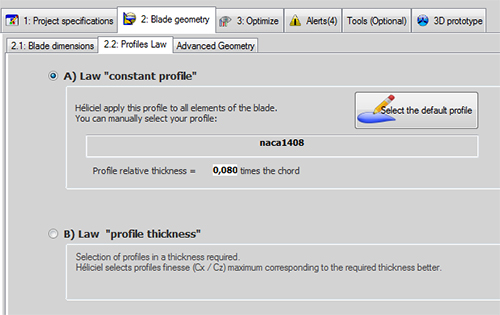
Tab 2.2 Profiles Law: constant profile naca1408, with a relative thickness of 0.080 times the chord.
Now we rebuild the propeller (click  ) to see whether the parameters are valid. Note the blade tip speed produced by our rotation speed and our blade length: 754 km/h, or 209 m/s. That is about 0.6 times the speed of sound (331 m/s in the Fluid tab), far too much for a wind turbine.
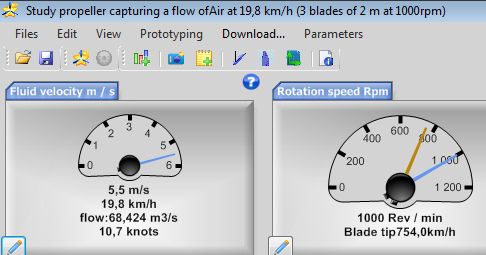
The Heliciel gauges: at 1,000 rpm, the blade tip reaches 754 km/h.
The list of alerts reports errors and proposes solutions. Among the errors is "Zero or negative induction defect of element no. …": it reveals an unsuitable rotation speed (we took 1,000 rpm at random). Among the proposed solutions, click "Optimize rotation speed".
This takes you back to the 3: Optimize tab. Click the automatic search for the optimum efficiency (the "3-blade propeller, optimum rotation speed" button). Heliciel runs a search for the optimum rotation speed for the chosen wind and blade geometry, and proposes a speed: 350 rpm.
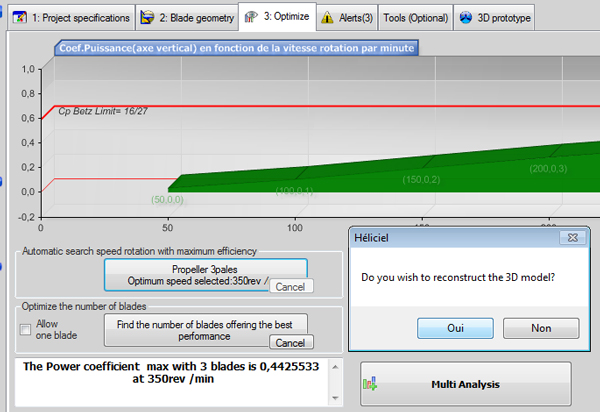
Optimize tab: the power coefficient curve versus rotation speed, and the Betz limit (16/27) in red. Heliciel finds a maximum of 0.4426 at 350 rpm.
Answer "Yes" so that Heliciel rebuilds the propeller and updates its performance.
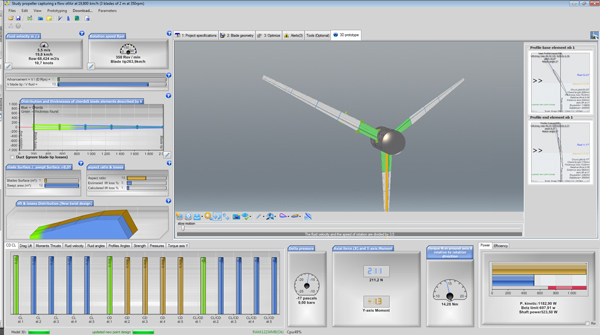
The rebuilt wind turbine in the 3D prototype tab, with its results at the bottom of the screen.
Our wind turbine and the twist of its blades are rebuilt; the performance appears in the results pane at the bottom of the screen. The shaft power is 523 W and the rotor efficiency is 0.443. Heliciel twisted the blades so that the airfoils see the fluid at an incidence that gives the best lift-to-drag ratio, taking the induced velocities into account. In its current geometry and at its current operating point, the propeller is therefore at its optimum twist: any other twist setting would give lower performance.
The automatic search for the rotation speed starts from the 3: Optimize tab. For the blade geometry and the wind speed that you impose, Heliciel calculates the rotation speed that gives the maximum power coefficient, then offers to rebuild the 3D model at that speed.
Now let us try to adjust the distribution of the blade chords to gain a little efficiency.
4b: Optimizing the geometry: effect of chords and number of blades
Let us change the chords of the blade and watch how the optimum speed and the efficiency evolve. We double the chords: 400 mm at the blade root and 100 mm at the tip. Do not forget to click "linearize" to update the distribution of the intermediate chords.

New chords: 400 mm at the root and 100 mm at the tip of the blade.
In the 3: Optimize tab, let us run the search for the optimum speed again. During the search, watch the ratio of blade tip speed to wind speed, and the efficiency getting closer to the Betz limit. The efficiency reaches a maximum when this ratio reaches about 7 (for a three-blade rotor).
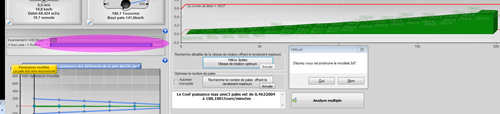
During the search, Heliciel varies the rotation speed and displays the blade advance; the result is a maximum power coefficient of 0.4622 at 188.18 rpm.
- The larger chords reduced the optimum rotation speed, now 188 rpm. The efficiency rose to 0.46 and the power increased slightly: we now have 546 W.
- We keep in mind that when the area occupied by the blades increases, through larger chords (or more blades), the optimum rotation speed decreases. This phenomenon lets us adjust the optimum speed to the application: a slow generator, for example, or a pump.
Let us keep this blade geometry (400 mm at the root, 100 mm at the tip). The "Optimize" tab offers a combined search for the optimum rotation speed and number of blades; it is long and can take up to 15 minutes. To spare you the wait, set the number of blades directly to 13 and run a search for the optimum speed. You should get this:
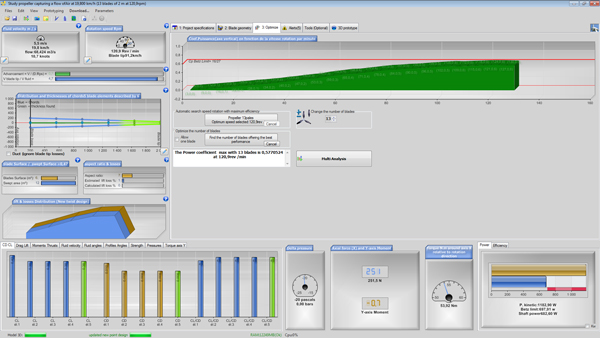
With 13 blades, Heliciel finds a maximum power coefficient of 0.578 at 122.1 rpm. The shaft power displayed (684 W) is very close to the Betz limit (697 W).
We get an optimum speed of 122 rpm. This drop in rotation speed agrees with the phenomenon described above. The efficiency, for its part, comes close to the Betz limit, hence the theoretical optimum: it is theoretically impossible to build a free-rotor wind turbine with better performance. The only drawback is that 13 blades are expensive to manufacture. But how do we explain this gain in efficiency?
5: Specific speed: slow or fast turbine, how to choose
Grab a cup of coffee and take a short break: what follows is, in my humble opinion, the key concept for mastering wind turbine design. It calls for particular concentration.
- When the rotation speed is low, the apparent wind and the angles of incidence of the airfoils give lift forces better aligned with the plane of rotation, and the drag slows the rotation less.
- But when the rotor slows down, the apparent gap between the blades grows. To avoid losing the energy of the air passing between the blades, we must add blades, but not too many, because they could disturb each other. There is therefore an ideal rotation speed for each number of blades.
- For the best efficiency-to-manufacturing-cost ratio, we look for a minimum number of blades.
- But to use all the air with few blades, the rotor must turn faster, so that the apparent gap between the blades shrinks to its ideal size.
- However, high rotation speeds give projections of lift and drag that are less favorable to efficiency.
- These disadvantages are offset by two facts: airfoils perform better at high speeds, and, for the same power, a high rotation speed generates less reaction torque, hence less swirl in the flow, hence fewer losses.
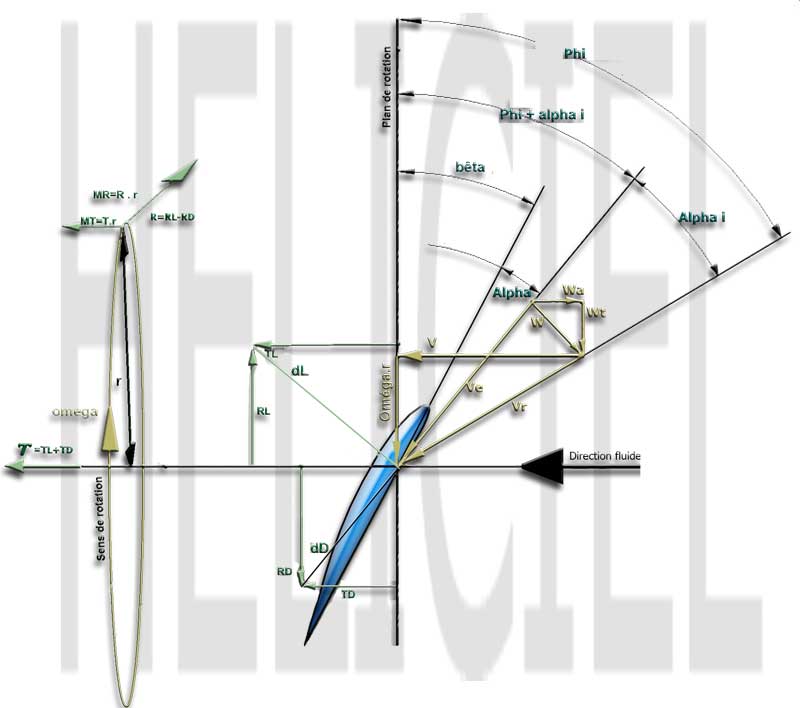
The velocities and angles at work on a blade element (V, ωr, relative velocity, pitch angle β, angle of attack α), and the resolution of lift and drag into thrust and torque.
Aerodynamic or hydrodynamic airfoils are a bit like people: there are tall ones, small ones, sturdy ones, slim ones, and they all have the flaws of their qualities. Give them the right conditions to express their qualities, and the best happens. Back to our airfoils: the performance of our wind rotor is the performance of the airfoils that make up the blades. The performance of an airfoil is summed up by the Cl/Cd ratio, called the lift-to-drag ratio of the airfoil. It varies with the speed of the fluid in which the airfoil moves: some airfoils have a good lift-to-drag ratio at low speed (cambered airfoils) and become worse at higher speeds (see the lift-to-drag ratio of aerodynamic airfoils).
To sum up, let us use the specific speed λ (tip-speed ratio): blade tip speed divided by wind speed. It measures how fast the wind turbine turns.
High specific speeds (fast wind turbine)
| Benefits | Disadvantages |
| Captures the energy with a low number of blades, hence enjoys their benefits: low manufacturing cost. | The projections of lift and drag are less favorable, which requires good quality airfoils, sometimes difficult to make. |
| The tangential rotation of the flow downstream of the propeller reveals the energy lost by the system. At equal power (P = torque in N·m × rotation speed in rad/s), a high rotation speed uses less torque, hence generates fewer losses. | The starting torque is often insufficient to start at low wind speeds: a starting assistance is sometimes needed. |
| Rotation speed closer to that of generators (the generator and gearbox cost less). | Rotation speed and torque not suited to pumping. |
| Little exposure to violent winds, by feathering. |
Low specific speeds (slow wind turbine)
| Benefits | Disadvantages |
| Allows simple blade shapes, cheap to manufacture. | To get good efficiency, many blades are needed (more expensive, heavier, more exposed to the wind in storms). |
| Starts even at low wind speeds. | The tangential rotation of the flow downstream of the propeller reveals the energy lost by the system. At equal power (P = torque in N·m × rotation speed in rad/s), a low rotation speed uses more torque, hence generates more losses. |
| Rotation speed and torque well suited to pumping. | Rotation speed poorly suited to generators (the generator and gearbox cost more). |
This list is far from complete, because each wind turbine results from a compromise dictated by the constraints of the project. In this tutorial we opted for a small number of blades producing electricity. We take three blades, because one or two blades cause vibration and mechanical endurance problems. The optimum specific speed of a three-blade wind turbine is generally 7.
6: Choose an optimum blade airfoil
Because of the losses at the blade tip and the low tangential speeds at the root, the zone of the propeller that works the most and the best is around 0.75 of the blade radius. We therefore pay particular attention to this zone, and we choose the airfoil whose lift-to-drag ratio is the best at the speeds (Reynolds number) found there.
- Go back to three blades ("Optimize" tab), with chords of 400 mm at the root and 100 mm at the tip, and a rotation speed of 188 rpm (apply it in tab 1.3 "Operating point"). Rebuild the propeller (button ).
- Let us look for another way to gain performance. To know the flow speed, or more exactly the Reynolds number of the "precious" zone, select element no. 4 in the 3D zone. Heliciel then displays a diagram of the airfoils that frame and define this blade element.
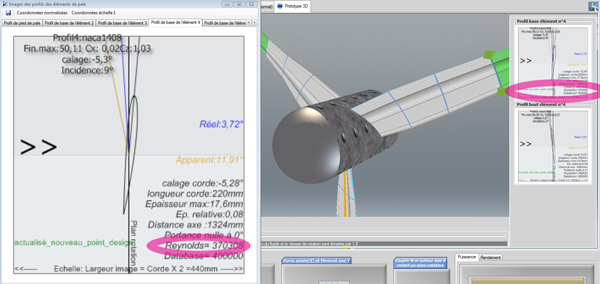
The diagram of the base airfoil of element 4 gives the airfoil (naca1408), its maximum lift-to-drag ratio (50.1) and the Reynolds number (370,000).
The Reynolds number of this element is about 370,000, and the NACA 1408 airfoil gives us a maximum lift-to-drag ratio of 50. Let us look in the airfoil database for an airfoil that performs better at this Reynolds number:
- In tab 2.2 "Profiles Law" of the blade geometry, click "Select the default profile".
- Sort the database by maximum lift-to-drag ratio (click the head of the f_max column).
- Pick a good lift-to-drag ratio for a Reynolds number of 300,000 (5 zeros only, not to be confused with 3,000,000) by clicking on the line "naca64a410, f_max = 89.17 at Re = 300,000".
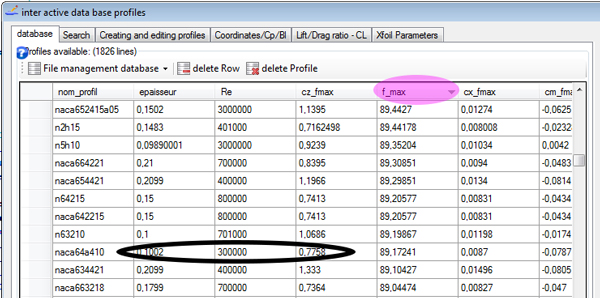
The airfoil database, sorted by f_max: the naca64a410 line (maximum lift-to-drag ratio 89.17 at Re = 300,000) is circled.
- Apply this airfoil as the default profile of our wind turbine by clicking "Default profile".
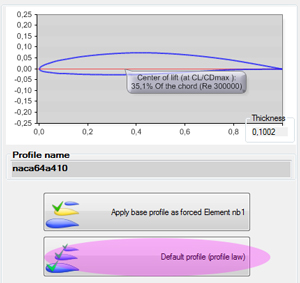
The naca64a410 airfoil (thickness 0.1002) and the two application buttons, including "Default profile" (profile law).
Heliciel applies the selected airfoil to your wind turbine and rebuilds the optimum twist. The result is unambiguous: the optimum performance slightly exceeds the Betz limit, which is theoretically impossible. No panic: it exceeds it by 0.9 W out of 688 W, which only reveals a calculation imprecision.
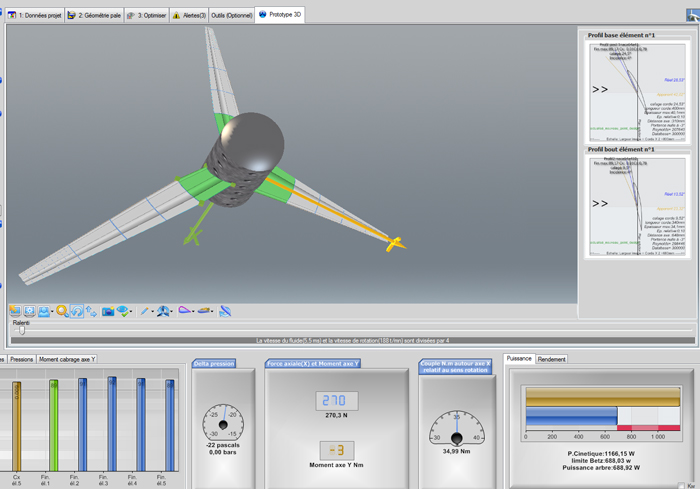
Shaft power: 688.92 W, for a Betz limit of 688.03 W and a kinetic wind power of 1,166 W.
We can increase the number of blade elements ("Tools (Optional)" tab) to gain accuracy. Try it with 10 elements: you will fall back to 675 W.
To go further, we can look at how a wind turbine aeromotor works, at what the Froude and Betz theory says about the power we can recover, or apply the same method to a tidal turbine, where cavitation adds to the constraints.
This is the end of this tutorial which, with a boost from the software, will help you become an expert in wind rotor design. I remain at your disposal for any comment or additional information via contact@heliciel.com.
JF Iglesias, Heliciel developer.
 Global site map
 Mecaflux
 Tutorials Mecaflux Pro3D
 Tutorials Heliciel
 Tutorials Heliciel PRO CFD
 Mecaflux Store
 Compare software functions
 Quotes, Orders, Payment Methods
 project technical studies