
Propeller and wing calculation results: performance displayed by Heliciel
After every parameter change, Heliciel rebuilds the blade or wing, calculates its performance and presents the propeller and wing calculation results in several forms: gauges for pressure, thrust, torque, power and efficiency, element-by-element graphs, a 3D view and a strength check. Heliciel keeps them in front of you so that you never lose sight of the goal you set.
In this page:
- The questions the results answer
- The overall performance of the propeller or wing
- Detailed results for each blade element
- Results in the 3D model
- Mechanical strength and failure alerts
1: The questions the results answer
When we design a propeller or a wing, the main question is usually: how much energy must I supply to obtain a given amount of converted energy? Depending on the type of study, it takes a precise form:
- For a wing: what speed must I reach to obtain the lift I want, and how much thrust will I have to supply to hold that speed?
- For a propulsive propeller: how much shaft power must I supply to obtain the thrust I want?
- For a ventilation fan: how much shaft power must I supply to obtain the pressure rise I want?
- For a wind turbine: what wind speed will give me the shaft power I am looking for?
The smaller the gap between the energy produced and the energy supplied, the better the propeller. The efficiency of the propeller or wing is therefore clearly visible in Heliciel throughout the design trials. These results depend on the operating point, which is set by the fluid speed and the rotational speed of the propeller.
2: The overall performance of the propeller or wing
Heliciel first gives the overall quantities of the propeller or wing: the pressure difference, the axial force in the direction of the fluid, the torque in the direction of rotation, the shaft power and the efficiency.
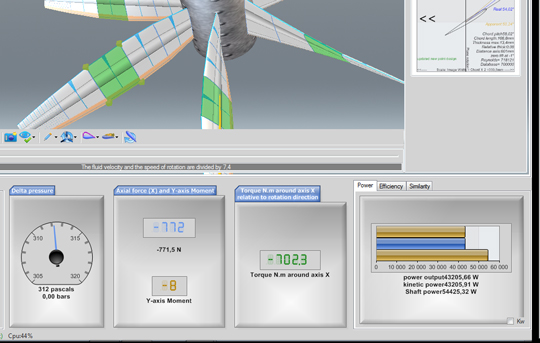
The overall results: three gauges (pressure difference, axial force in the fluid direction, torque in the direction of rotation) and, on the right, the Power, Efficiency and Similarity tabs. The power tooltip recalls how it is calculated: shaft torque multiplied by angular speed.
3: Detailed results for each blade element
Heliciel also lets us analyse the results element by element. Each tab under the 3D model shows a bar graph, one bar per blade or wing element, from the root towards the tip. Here are the tabs, in the order in which they appear.
CD CL: the drag coefficient (Cd) and lift coefficient (Cl) of each element.
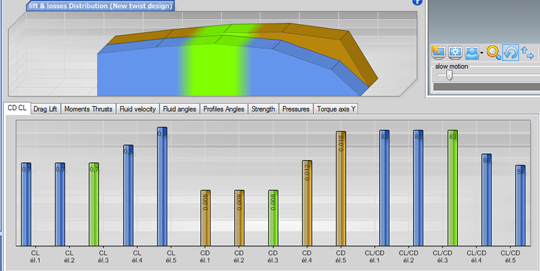
Cd and Cl of the elements as blue and gold bars, from the root towards the blade tip.
Lift Drag: the same elements, in newtons.
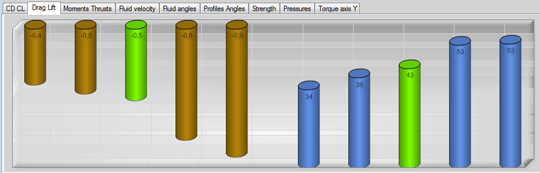
Drag and lift in newtons: two series of bars, gold and blue, give the force on each element.
Torques Thrust: the moment and thrust of each element.
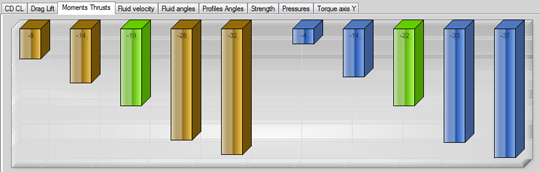
Moment and thrust of each element: these contributions add up to the torque and thrust of the propeller.
Fluid velocity: the distribution of apparent speeds and induced velocities along the blade.
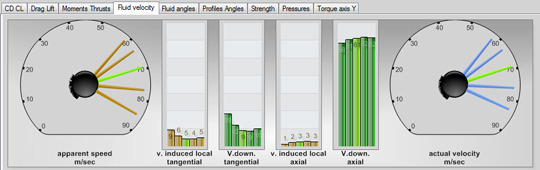
Four views: the apparent speed, the tangential and axial induced velocities, and the real speed of each element.
Fluid angles: the apparent angles, the induced angles and the real fluid angle at each element.
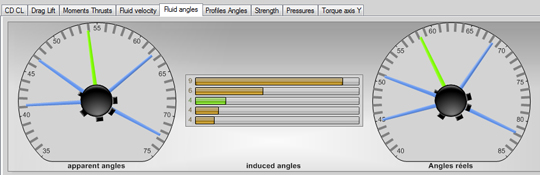
The apparent angles, the induced angles and the real fluid angle, element by element.
Profiles Angles: the pitch angle of each profile, its angle of attack and its zero-lift pitch angle.
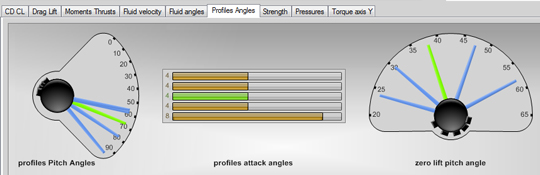
The pitch angles, angles of attack and zero-lift pitch angles of the blade profiles.
Strength: the bending applied to each element and the bending it can withstand (see below).
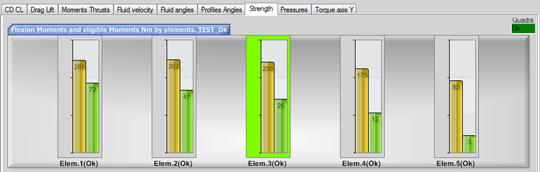
For each element, the calculated bending (green) against the allowable bending (yellow).
Pressures: the pressure distribution over the elements, with the cavitation limit (static pressure plus saturated vapour pressure).
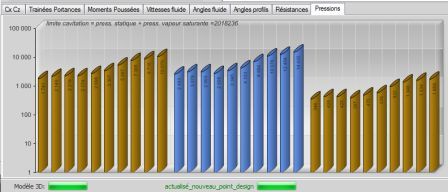
The pressure distribution on a logarithmic scale: one bar per element and per face.
4: Results in the 3D model
Some of these results also appear on the 3D model when we select the graph type. Here, the drag and lift of the blade are drawn on each element: the blue and gold bars start from the blade and lengthen with the force.
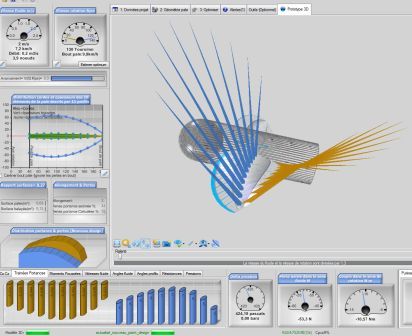
The 3D model of the propeller, with the drag and lift of the blade elements as coloured bars. Below, the element-by-element graph stays visible.
5: Mechanical strength and failure alerts
A propeller or wing with good efficiency must also be strong enough to be realistic. You choose the construction material from a list, and Heliciel continuously tests the mechanical strength of the blade, updating it at every geometry change. The strength of each element is displayed as a graph showing the maximum allowable bending and the applied bending load. Failure alerts turn red according to the safety factor applied.
The Strength tab shows, for each element, the allowable bending and the calculated bending. An element that exceeds the limit appears in red in the graph and in the 3D view.
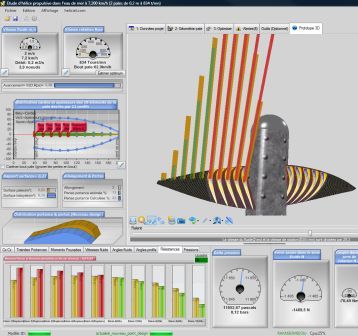
The red elements are those whose bending exceeds the allowable limit. Here the selected material is polystyrene: at about 800 rpm, sure enough, crack!
To go further, we can see how the operating point of a propeller conditions these results, or compare several speeds with the multiple operating point analysis.
 Global site map
 Mecaflux
 Tutorials Mecaflux Pro3D
 Tutorials Heliciel
 Tutorials Heliciel PRO CFD
 Mecaflux Store
 Compare software functions
 Quotes, Orders, Payment Methods
 project technical studies