
Modify the profile database used by Heliciel: change, add or download a database
To change the profile database Heliciel uses, you have three operations: load another database in place of the current one, add the data of another database to the current one, or download a new database. All three are in the File management database menu of Heliciel's interactive data base, the window that lists blade and wing profiles together with their performance.
In this page:
- Why change the profile database
- Load another profile database
- Add data from another database to the current one
- Download a profile database
- Profile database and calculation speed
1: Why change the profile database
Heliciel picks the profiles of your wing or propeller blade from the loaded database. For each profile, this database holds the shape and the polars, that is the lift and drag coefficients (Cl and Cd) as a function of angle of attack and Reynolds number. Heliciel only knows what the database contains: a profile that is not in it cannot be selected.
Changing the database therefore narrows or widens the catalogue Heliciel draws from. If you want it to use one family of profiles rather than another (flat underside, symmetrical, NACA...), load a database that contains only the shapes you want. You keep control of the choice without checking each profile one by one. The profile selection methods and laws describe how Heliciel then uses this database.
2: Load another profile database
In the File management database menu of the interactive data base, choose Open and Use a different database profiles, then select the file of the database you want. The loaded database replaces the current one for the project in progress.
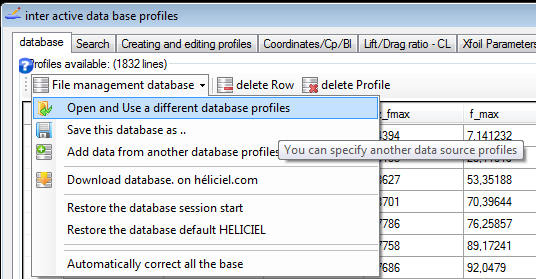
The database management menu: one entry loads another database.
If the loaded database does not contain the project's default profile, Heliciel tells you with a message.
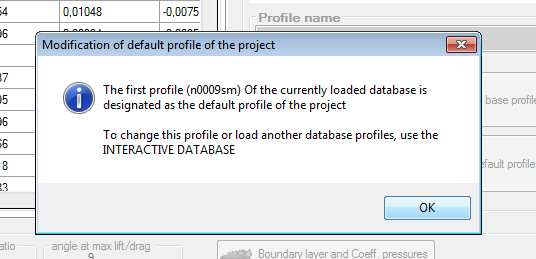
The warning message: the first profile of the loaded database becomes the default profile of the project.
This is not an error, but a point to check: the default profile of your project has just changed. Review the choice of profiles for your blade or wing before going on.
3: Add data from another database to the current one
Instead of replacing the database, you can add two together. The Add data from another database profiles entry enlarges the current database with the profiles of another file. It is the right option to complete a database of symmetrical profiles with a few flat-underside profiles, for example.
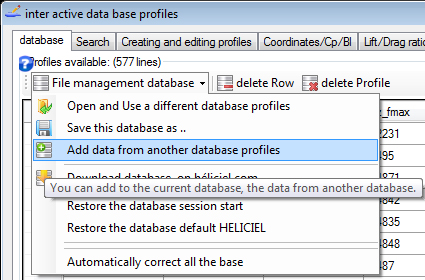
The same menu, with the entry that adds a second database to the current one.
You can then save the enlarged database with Save this database as .. to load it in a future project. The menu also lets you go back to the database of the start of the session (Restore the database session start) if you regret a change, or restore the default Heliciel database.
4: Download a profile database
- Download the database from the page of free downloads of profile databases and save it in the folder C:/Programs/HELICIEL/heliciel/bases profils/.
- In the File management database menu of the interactive data base, choose Open and Use a different database profiles and select the downloaded database.
The menu also has a Download database on héliciel.com entry, which saves you from looking for the file by hand.
5: Profile database and calculation speed
In imposed thickness law mode, Heliciel searches the database for the profile whose thickness is closest to the one requested. The time this search takes grows with the number of profiles in the database. We therefore advise you to work with small databases suited to your project: selection is faster, and the profiles retained stay within the family you chose.
To go further, we can look at all the functions of the interactive data base in the user guide to the aerodynamic and hydrodynamic profile database, or at how a profile is chosen in the page on choosing the blade profile.
 Global site map
 Mecaflux
 Tutorials Mecaflux Pro3D
 Tutorials Heliciel
 Tutorials Heliciel PRO CFD
 Mecaflux Store
 Compare software functions
 Quotes, Orders, Payment Methods
 project technical studies