
Profile selection laws for propellers and wings: constant profile or by thickness
The profile selection laws for propellers and wings set how Heliciel chooses the profile of each blade element. Heliciel uses its database of profile performance to choose the optimal profiles that match the operating conditions and the geometry of your blade or wing. Two laws are available: the constant profile law, the simplest, and the profile-by-thickness law, which takes a little more experience.
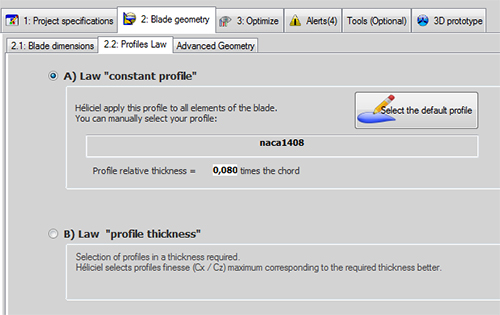
The « 2.2: Profiles Law » tab: law A applies the chosen profile to every element (here naca1408, a relative thickness of 0.080 times the chord); law B selects profiles automatically from the thickness you impose.
In this page:
- Law A: constant profile along the whole blade or wing
- Law B: profile by thickness, to control the strength of the blade
- Which law to choose for a propeller or a wing?
- Imposing a chosen profile on one element
1 : Law A: constant profile along the whole blade or wing
With the constant profile law, Heliciel applies the profile you have selected all along the blade. The thickness of the blade is tied to the chord (the width) of the blade, since the profile does not change shape: the chord varies, so the size of the profile does, but its relative thickness stays the same.
Heliciel collects the lift (Cl), drag (Cd) and moment (Cm) coefficients of the chosen profile. By default, it retains the angle of attack that gives the best lift-to-drag ratio (Cl / Cd). The twist of the propeller is then sought from the induced velocities on each element, so that the effective angle of attack is the one of best lift-to-drag ratio.
This selection law is the simplest, and we strongly recommend it to beginners. Think of a tailor who cuts every size from the same pattern: the result is predictable, and there is no unexpected seam to redo.
2 : Law B: profile by thickness, to control the strength of the blade
The profile-by-thickness law lets you choose how the thickness changes along the blade; the profiles are therefore of different shapes. Heliciel searches for and selects the optimum-performance profiles that best match the desired thickness. The chart of chord and thickness distribution draws the thicknesses found in green, so you can see the gap with your request. That gap is hard to avoid: it is rare for a profile in the database to have exactly the requested thickness.
This law takes a little more experience. It often involves discontinuities of shape and angle of attack, which have to be managed with functions for smoothing the angle of attack and forcing the shape of profiles. In exchange, it gives better control of the strength of the blade. See also the distribution of blade thickness and the management of the angle of attack of profiles.
3 : Which law to choose for a propeller or a wing?
We start from law A for a first calculation: it gives a coherent blade, and we see what the profile alone brings. We move to law B when the strength of the blade calls for a precise thickness, or when the blade root has to be thicker than the tip. For the structure, see the blade strength in bending and centrifugal tension.
The law is chosen in the 2: Blade geometry tab, 2.2: Profiles Law sub-tab. With law A, you impose the profile; with law B, you impose the thickness and Heliciel picks the profile from its database.
4 : Imposing a chosen profile on one element
You can also impose a chosen profile on a blade element, whichever law is used: see forcing profiles. For wings as for propellers, we can also draw and correct a profile before forcing it: see drawing, correcting and editing a profile.
To go further, we can see how the chord distribution is set along the blade, or how to use the Heliciel profile database.
 Global site map
 Mecaflux
 Tutorials Mecaflux Pro3D
 Tutorials Heliciel
 Tutorials Heliciel PRO CFD
 Mecaflux Store
 Compare software functions
 Quotes, Orders, Payment Methods
 project technical studies